Terraform - Solve Dynamic Backend problem with Golang
Originally published on an external platform.

As I mentioned in my previous blog, Terraform can store the tfstate file in a remote location. However, the backend block needs to be initialized with terraform init and it doesn’t support interpolation. This means we have to manually populate the block below before we run terraform init or use the -backend-config switch:
terraform {
   backend "s3" {
      bucket = "mybucket"
      key    = "path/to/my/key"
      region = "us-east-1"
   }
}
This requires changing the key every time you create a new resource or combination of resources. While this is manageable for small deployments, it becomes a major headache for larger footprints.
To solve this, we must dynamically generate the backend block before executing terraform init.
The Goal
The objective is to build a tool that generates the backend block automatically and establishes a 1:1 relationship between tfvars files and tfstate files. Here are the core requirements for the tool:
- Environment Integration: Take environment variables for
S3,DynamoDB, andRegion. - Input Handling: Accept a
tfvarsfile as an argument. - Dynamic Generation: Generate the backend configuration using either environment variables or the absolute path of the
tfvarsfile. - Automation: Support
terraform init,plan,apply, anddestroy. - Smart Execution:
- Run
init,plan, andapplyif the file extension is*.tfvars. - Run
plan -destroyanddestroyif the file extension is*.destroy.
- Run
Explanation
Our tool, named autotf, features two primary sub-commands: verify and deploy.
Flow Control and Decision Making
The tool’s actions are dictated by the file extension provided.
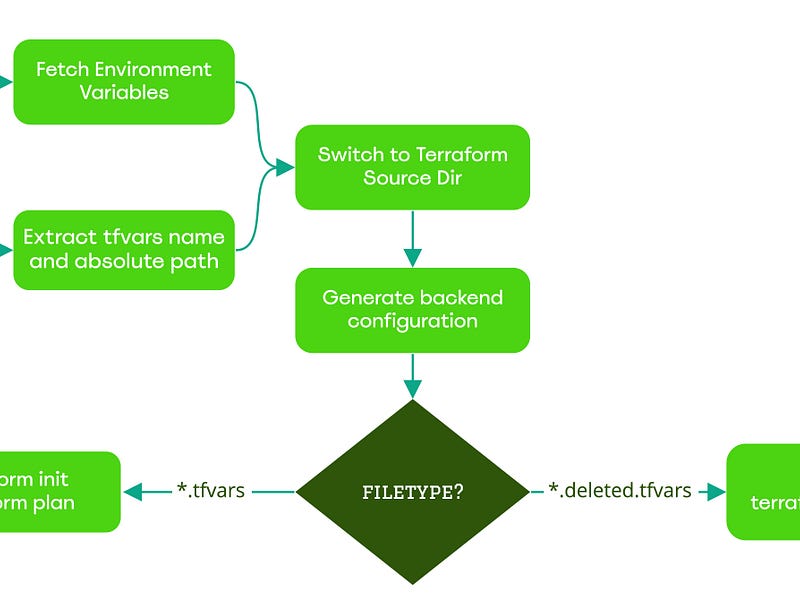
Building Resources
1. The verify Command
By running the following sequence:
export S3Bucket="some-s3-bucket"
export Region="us-east-1"
export DynamoDB="some-dynamodb-table"

./autotf verify stage/s3/autotf-testing01.tfvars
autotf will automatically generate the backend configuration, initialize Terraform, and then execute terraform plan (or plan -destroy if using a *.destroy file).
Example Output
INFO 2022-03-28 17:50:29 will run terraform init, plan on [autotf-testing01.tfvars]

+------------------+----------------+-------------------------+-----------------------------------+
| Resource Name    | Backend Bucket | TFVars Name             | Backend Key                       |
+------------------+----------------+-------------------------+-----------------------------------+
| autotf-testing01 | autotf-testing | autotf-testing01.tfvars | stage/s3/autotf-testing01.tfstate |
+------------------+----------------+-------------------------+-----------------------------------+

Initializing the backend...
Successfully configured the backend "s3"!

Terraform has been successfully initialized!

Acquiring state lock. This may take a few moments...
Terraform used the selected providers to generate the following execution plan:

  # aws_s3_bucket.bucket will be created
  + resource "aws_s3_bucket" "bucket" {
      + bucket                               = "autotf-testing01"
      + region                               = "us-east-1"
      + tags                                 = {
          + "Environment" = "Dev"
          + "Name"        = "autotf-testing01"
        }
    }

Plan: 1 to add, 0 to change, 0 to destroy.
Releasing state lock. This may take a few moments...
2. The deploy Command
To apply the changes, run:
./autotf deploy stage/s3/autotf-testing01.tfvars
Example Output
INFO 2022-03-28 18:07:27 will run terraform init, plan and apply on [autotf-testing01.tfvars]

Initializing the backend...
Terraform has been successfully initialized!

Acquiring state lock. This may take a few moments...
aws_s3_bucket.bucket: Creating...
aws_s3_bucket.bucket: Creation complete after 2s [id=autotf-testing01]
Releasing state lock. This may take a few moments...

Apply complete! Resources: 1 added, 0 changed, 0 destroyed.

Outputs:
bucket_name = "autotf-testing01"
Destroying Resources
Destroying resources follows the same control flow but triggers based on the .destroy extension.
# Rename the file to signal destruction
mv stage/s3/autotf-testing01.tfvars stage/s3/autotf-testing01.destroy

# Run the deploy command
./autotf deploy stage/s3/autotf-testing01.destroy
Destruction Output
INFO 2022-03-28 18:13:07 will run terraform init, plan -destroy on [autotf-testing01.destroy]

Initializing the backend...
Terraform has been successfully initialized!

Acquiring state lock. This may take a few moments...
aws_s3_bucket.bucket: Refreshing state... [id=autotf-testing01]

Terraform will perform the following actions:
  # aws_s3_bucket.bucket will be destroyed
  - resource "aws_s3_bucket" "bucket" {
      - bucket = "autotf-testing01" -> null
    }

Plan: 0 to add, 0 to change, 1 to destroy.

aws_s3_bucket.bucket: Destroying... [id=autotf-testing01]
aws_s3_bucket.bucket: Destruction complete after 0s
Releasing state lock. This may take a few moments...

Destroy complete! Resources: 1 destroyed.
The autotf Utility
You can find the source code for this tool at github.com/kodelint/autotf.
Note:
autotfwas created for demonstration purposes to show how to eliminate one of Terraform’s primary pain points. While functional, it is a simplified version of the sophisticated internal tooling we use in production.
Infrastructure Rules I Follow
To maintain sanity in large-scale environments, I follow these self-imposed rules:
- Naming Consistency: I ensure that Resource Name = TFvars filename = TFstate filename. This makes the 1:1 relationship transparent and easy to track.
- Derived Naming: For multi-resource entities, names are automatically derived from the primary resource name.
- Concise TFVars: Keep
tfvarsfiles as short as possible by utilizingdefaultsin the modules. - Logic Over Hardcoding: Use
ternary operatorsextensively to handle both computed and provided values. - Nimble Modules: Build modules to be as self-sufficient as possible.
- Fail Fast: Write
validationblocks wherever possible to catch errors during theplanphase. - Implicit Dependencies: Avoid
depends_onin favor of natural resource attribute referencing.

Using an external wrapper provides the flexibility to manage complex infrastructure without the manual burden of editing backend configurations at every turn. Dynamic generation is the key to scalable Terraform management.